IDM Heatpump - Home Assistant Integration
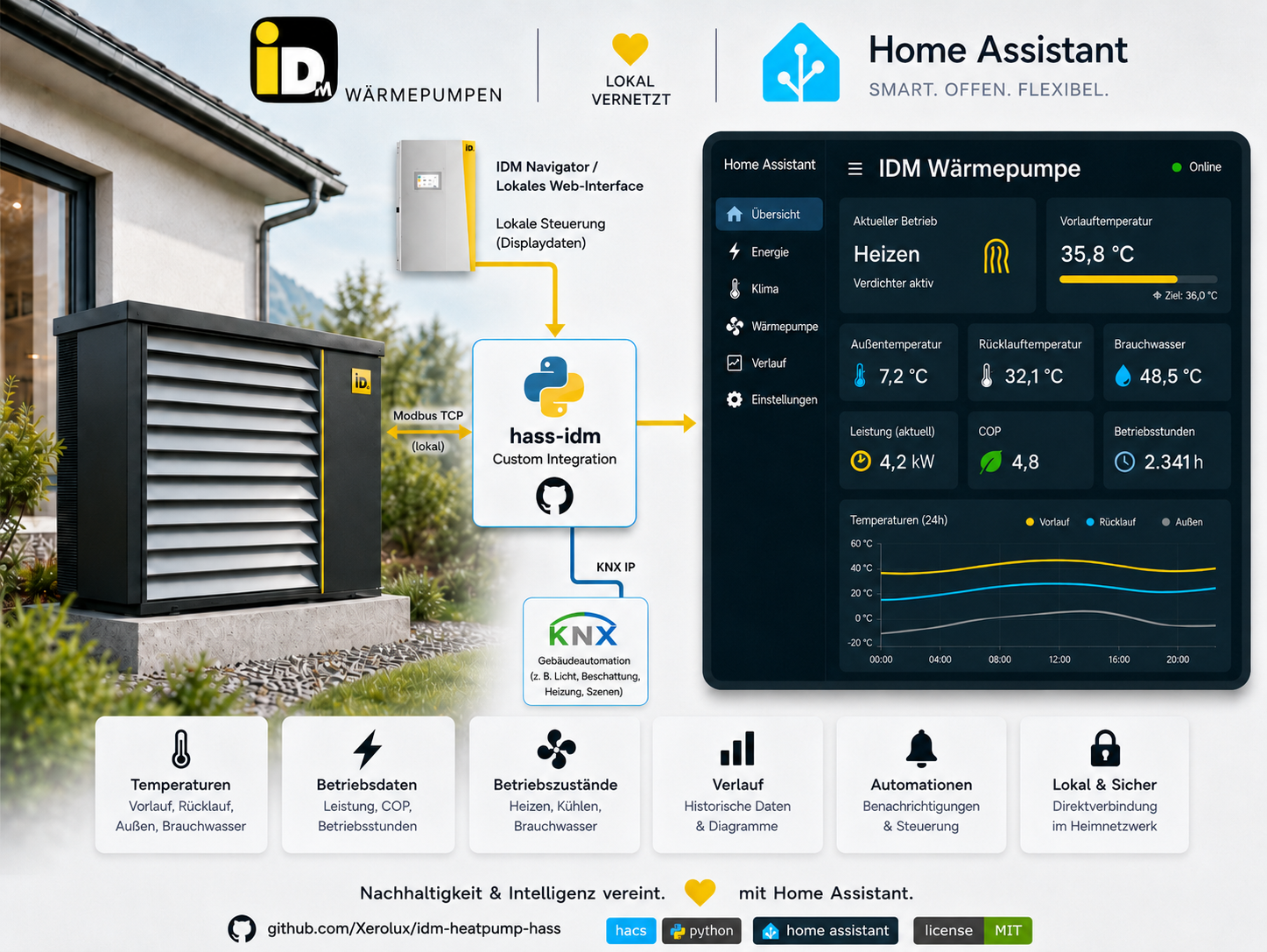
AI generated
The complete documentation for the IDM Heatpump integration. From installation to troubleshooting — with all features, entities, and services.
Important prerequisite: Modbus TCP must be enabled on the IDM Navigator/controller under Building management system (Gebäudeleittechnik) → Modbus TCP → On (Ein). See Installation & Setup.
What is the IDM Heatpump Integration?
The IDM Heatpump Home Assistant Integration connects Home Assistant with IDM Navigator controllers by IDM EnergieSysteme GmbH. It enables local monitoring and supported controls via Modbus TCP — no cloud, no subscription. Navigator 10 has direct hardware confirmation; Navigator 2.0 and Navigator Pro remain under broader compatibility validation.
| Feature | Details |
|---|---|
| Protocol | Modbus TCP (Port 502, Slave ID 1) |
| Optional supplement | Local Navigator web API, read-only, PIN optional |
| Documentation version | 0.19.0; latest stable release |
| Supported/tested HA baseline | 2026.8.1 |
| Python | 3.14+ (managed by Home Assistant) |
| Connection library | modbus-connection==4.12.2 |
| Socket backend | tmodbus[async-serial]==0.6.2 |
| Device/web library | idm-heatpump-api[web]==2.6.0 |
| License | MIT |
| Languages | DE, EN |
| Entities | Model- and configuration-dependent sensors, binary sensors, numbers, selects, switches, climate, water heater, and buttons |
Core Features
New in 0.19.0
0.19.0 makes the Navigator 1.0/1.7 a first-class citizen and gives photovoltaics a face. Everything stays local; no entity IDs change.
| Feature | What you get |
|---|---|
| Navigator 1.0/1.7 writable block | System and heating-circuit operating modes, room/flow setpoints, heating curves, limits and bivalence points from the official parameter table |
| Navigator 1.0/1.7 warm-water card | Water heater entity with the capture-verified freshwater setpoint (FW030 float pair) and the tank temperature |
| Firmware-honest readings | Readings outside a register's documented range go unavailable instead of showing garbage from pre-2016 firmware |
| Per-register diagnostics | The diagnostics export lists every register with its read verdict, raw wire words and rejection reason |
| PV visibility | Derived PV-surplus diagnostic, the Navigator 10's own demand reason from its web interface, and a dedicated Photovoltaik device group |
| Solar thermal opt-out | Plants without collectors can switch the solar module off — polls and the empty device group disappear |
| Bilingual documentation | German mirrors of all 21 wiki pages at /docs/de/…, with the EN/DE switch in the URL |
New in 0.18.0
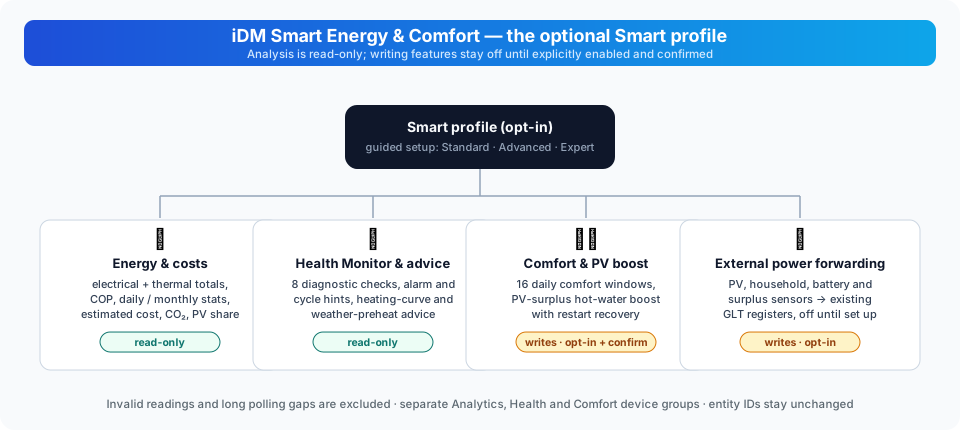
0.18.0 ships two flagship feature sets — the optional Smart Energy & Comfort package and the experimental AI plant adviser — plus a guided setup that replaces the long options form. Everything stays local by default and every automatic control remains off until explicitly enabled.
| Feature | What you can do | Device writes |
|---|---|---|
| Standard / Advanced / Expert setup | Choose the amount of configuration detail; all three modes offer the same functions | Selecting a mode does not write registers |
| Smart or Vanilla profile | Keep the core controller entities, or add energy and operating analysis with Smart | Analysis is read-only; boost controls write when used |
| Persistent energy statistics | Track electrical and thermal energy, COP, estimated costs, CO₂ and PV use | None |
| PV surplus DHW manager | Start a bounded hot-water boost using selected HA power and optional battery sensors | Optional; off by default, exclusive-control confirmation required |
| Comfort schedules | Apply daily room targets to selected circuits, with up to 16 windows and conditional restore | Optional; off by default, exclusive-control confirmation required |
| Heating and weather advice | Read flow-temperature hints and a six-hour weather recommendation | None |
| Health Monitor and installer report | Inspect eight diagnostic checks, operation history and redacted diagnostics | None |
| External power forwarding | Forward PV, household, battery and surplus sensors to the existing GLT registers | Optional; off until configured |
| Feature device groups | Find Analytics, Health Monitor, Comfort and Diagnostics separately | None; entity IDs remain unchanged |
| AI plant adviser (experimental) | Daily, weekly, health and efficiency reports from measured facts — by default without any model call; dedicated AI device, four report buttons, dashboard export, restart-safe schedule, local statistical learning with live progress | None; read-only, off by default |
| Optional model explanations | Free-form reports via local Ollama, an existing HA AI Task entity, or consented OpenAI/Z.ai — numeric-integrity guard, numerical fact allowlist, daily request limit | None; consent required for cloud paths |
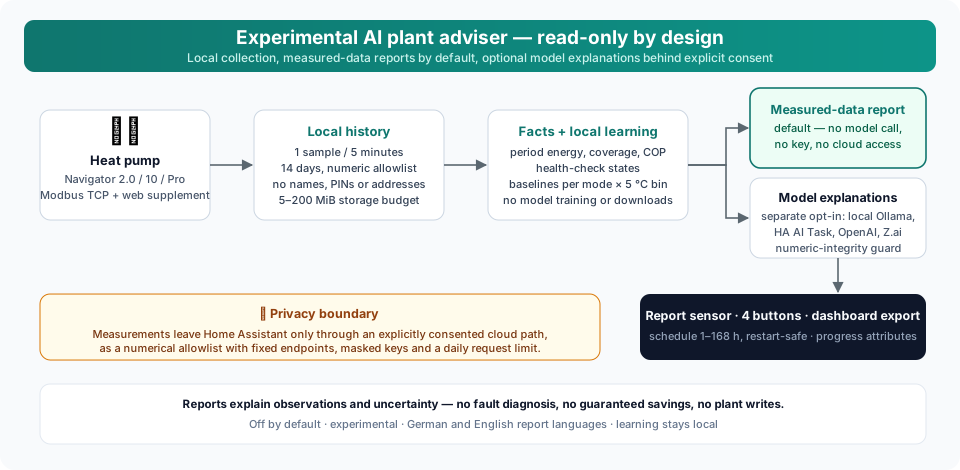
Start with iDM Smart Energy & Comfort for activation, examples, defaults and limitations, and with the Experimental AI adviser for setup, report modes, privacy and the dashboard.
Controller integration
- System Monitoring: Flow, return, hot water, outdoor temperature, pressure, flow rate
- Heating Circuits A–G: Up to 7 heating circuits with individual setpoint and mode control
- Zone Modules: Up to 10 zones with up to 8 configurable rooms each; current Navigator 10 hardware defaults to 6 rooms per module.
- Solar & PV: Solar hot water heating, PV surplus utilization, battery monitoring
- Energy Monitoring: Heat quantity, runtimes, energy meters
- Cascade & Bivalence: Multi-heat pump control, heating element integration
- BMS Remote Maintenance: BMS temperature requests (cyclic writing)
- Error Management: Error detection, error acknowledgment, diagnostics export
- Optional Web Supplement: Navigator generation, software version, heat pump model, compact myIDM ID, web-only diagnostics, and Navigator 10 infosystem notifications without replacing Modbus values; default interval 30 seconds
- KNX Bridge (optional): Serves the IDM KNX communication objects — same object numbers, datapoint types and directions as IDM's ETS example project — through the Home Assistant KNX integration, so the Weinzierl KNX IP BAOS gateway module is no longer needed. See KNX Bridge.
- Room Temperature Forwarding: Optional forwarding of Home Assistant temperature sensors to IDM external room temperature registers per heating circuit
- Readable Diagnostics: Internal IDM messages are shown with text plus structured code/text attributes
- Direct local Modbus runtime:
modbus-connectionand tmodbus own the per-entry socket;idm-heatpump-apikeeps the IDM register and safety logic
Platforms & Entities
| Platform | Entities | Description |
|---|---|---|
| Sensor | model-dependent | Temperatures, pressures, flow rates, energy, PV, solar, cascade, booster, runtime versions |
| Binary Sensor | model-dependent | Fault alarms, compressor status, heating/cooling/DHW demand, web states |
| Number | model-dependent | Writable setpoints, limits, GLT parameters, power limits |
| Select | model-dependent | System mode, circuit modes, solar/ISC mode |
| Switch | model-dependent | External heating/cooling/DHW demand |
| Climate | per circuit + zone room | Heating/cooling mode + target temperature for heating circuits and zone-module rooms |
| Water Heater | 1 | DHW target temperature with current temperature readback |
| Button | 1 | Acknowledge active errors on the heat pump |
Quick Navigation
I'm new here
I want to automate
I have a problem
I want to contribute
Technical Details
- Batch reading: Only exactly adjacent, non-overlapping ranges are grouped, up to 40 Modbus words per request
- Value validation: Unavailable sentinels are omitted as unused; suspicious grouped values are checked individually and quarantined for the client session
- Library-powered: All registers from
idm-heatpump - Actionable setup diagnostics: Separate messages for hostname/DNS errors, refused or disabled Modbus TCP, timeouts, unreachable endpoints, wrong slave IDs, invalid web PINs, and unavailable web interfaces
- Runtime version visibility: Integration,
idm-heatpump-api,modbus-connectionandtmodbusversions are available in a diagnostic sensor, diagnostics exports, and startup logs - Data types: FLOAT, UCHAR, INT8, INT16, UINT16, BOOL, BITFLAG
- EEPROM protection: Sensitive registers tracked and protected
- Transport boundary: Raw FC03/FC04 reads and FC16 writes use the exact
modbus-connection==4.12.2/tmodbus[async-serial]==0.6.2pair;4.12.2is the connection-library version, not the IDM integration version - API boundary:
idm-heatpump-api[web]==2.6.0provides batching, decoding and write safety. The API owns its own exception hierarchy; the integration uses the tmodbus-backed socket without a pymodbus dependency - Auto-recovery: API retry/backoff plus reconnect-on-demand in the tmodbus-backed connection
- Connection ownership: Each config entry owns one socket and reports
supports_shared_connection: false; Home Assistant central cross-entry sharing is not currently available - Validation status: Automated checks and read-only Navigator 10 observations are available; they do not replace candidate-specific clean-install, long-duration and broader model validation. See Stability & Release Readiness.
- Navigator 10: Heat sink sensors, flow rate (Sieb monitoring), groundwater temps, booster A/B
- Web supplement: Setup tests both supported local protocols when needed, stores the successful Navigator family, reuses its session and retries only that same protocol during normal runtime recovery
- Room forwarding: Optional write path with state-change updates, periodic refresh, tolerance and range checks
Links & Resources
| Resource | Link |
|---|---|
| GitHub Repository | https://github.com/Xerolux/idm-heatpump-hass |
| Community, Questions & Ideas | https://github.com/Xerolux/idm-heatpump-hass/discussions |
| Issues & Bugs | https://github.com/Xerolux/idm-heatpump-hass/issues |
| HACS | https://hacs.xyz/ |
| Home Assistant | https://www.home-assistant.io/ |
| IDM EnergieSysteme | https://www.idm-energiesysteme.de/ |
This wiki documents the IDM Heatpump integration. Developed by Xerolux
Experimental AI adviser (upcoming)
The experimental adviser provides daily/weekly reports and explanations of health and efficiency. It is off by default and has no plant control tools or voice exposure. Ollama is local; v0.17.2-b10 adds separately consented OpenAI and Z.ai reports with bounded requests. See setup, report actions, data coverage and limitations.