iDM Smart Energy & Comfort
The integration can run as a slim Vanilla integration or with the optional iDM Smart Energy & Comfort feature profile.
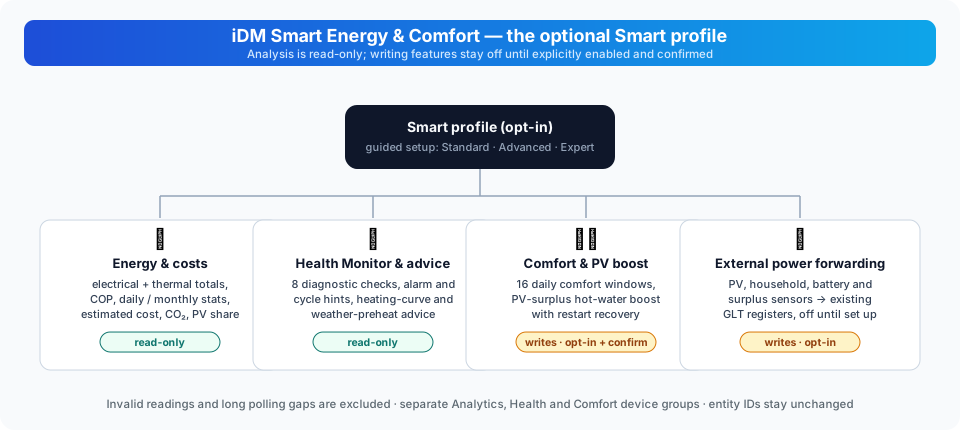
This guide covers 0.18.0.
| Feature | Default | Effect on the heat pump |
|---|---|---|
| Smart profile | On | Adds analysis and boost controls; analysis alone does not write |
| Health Monitor | Off | Read-only checks and report |
| Heating-curve / weather advice | Off | Read-only recommendations |
| External power forwarding | Off | Writes selected HA values to IDM GLT inputs |
| Automatic PV surplus DHW charging | Off | Starts the DHW boost when enabled and eligible |
| Comfort schedule | Off | Writes and conditionally restores circuit room targets |
Forwarding, automatic DHW charging and scheduling are separate options. Turning on Smart or choosing Expert mode does not turn these write features on.
Vanilla
Vanilla exposes the core IDM Modbus and web entities. It keeps the integration compact and does not create additional calculated analysis entities.
iDM Smart Energy & Comfort
This profile adds local calculated sensors, compressor runtime and cycle analysis, short-cycle diagnostics, persistent electrical and thermal energy statistics, COP statistics, and safe domestic-hot-water boost controls. The analysis is read-only. It does not stop the compressor or change the heating curve.
Activation
Open Settings → Devices & services → IDM Heatpump → Reconfigure → Features. Choose Standard, Advanced or Expert, select the Feature profile category and choose either:
- iDM Smart Energy & Comfort for the optional features
- Vanilla for the core IDM entities only
All setup depths offer the same functions. Advanced and Expert expose more tuning options; existing values from a deeper mode remain saved. Select the additional categories you need, follow their pages, then confirm to save.
Saving reloads the integration. Core entity IDs remain unchanged. Disabling Smart, Health or an adviser removes its optional entity registrations; re-enabling it recreates its entities with the same IDs. Device hierarchy is optional: Analytics, Health Monitor, Comfort and Diagnostics have distinct groups when it is enabled.
Persistent energy statistics
When the required IDM power registers are available, Smart adds total, daily and monthly electrical and thermal energy sensors, plus total, daily and monthly COP sensors. Values are integrated only from finite, non-negative power readings and are stored across Home Assistant restarts. Long polling gaps and invalid readings are excluded instead of being estimated.
Both electrical and thermal power registers must provide valid samples. Counters resume with new valid intervals after a gap; they do not reconstruct energy consumed while Home Assistant was offline. Daily and monthly periods follow the Home Assistant timezone and reset on the next observed snapshot. In beta 6, the daily PV estimate resets with the other daily values, and the power registers remain in the polling plan even if their raw entities are disabled. Lifetime totals are retained across period changes.
The same statistics provide optional estimated electricity costs, CO₂ emissions and PV self-consumption by the heat pump. The electricity price and emission factor are local Config Flow values. An optional Home Assistant sensor with a price in EUR/kWh, €/kWh or ct/kWh can supply a changing tariff. Each observed interval is priced at the current value; intervals with an invalid or unavailable price remain unpriced while their energy is still counted. The old fixed-price estimate is preserved when an existing installation switches to the sensor. PV self-consumption is calculated only when a PV-production source is selected in the external power mapping. It is an estimate capped by the heat pump's electrical energy and the selected PV production, not a measured allocation of solar energy: household loads and battery flows are not deducted. Cost defaults to EUR 0.30/kWh and the emission factor to 350 g CO₂/kWh; configure values appropriate to your installation. Negative tariffs and prices above EUR 5/kWh are treated as invalid by the current implementation.
Analytics entities are placed in a separate iDM Analytics device group when device hierarchy is enabled. This keeps the main heat-pump device focused on controller values and does not change entity IDs.
Optional PV surplus DHW automation
The automatic PV surplus DHW charging option is disabled by default. It uses the selected external power sensors and only starts the existing transactional DHW boost. Normal heating, the heating curve and the electric heater are not changed.
Requirements:
- Smart profile is active.
- The external power source mapping contains either a PV-surplus sensor or PV production and house-consumption sensors.
- A battery SOC sensor can optionally enforce a minimum battery level.
- The confirmation that Home Assistant is the only DHW controller is enabled.
Without the ownership confirmation the automation never starts. Do not enable it while Smartfox, openWB or another system controls domestic hot water. Invalid or unavailable source values fail closed. Minimum surplus, minimum SOC, DHW target, maximum duration and cooldown are configurable.
| Setting | Default | Setup depth |
|---|---|---|
| Minimum surplus | 1.0 kW | Advanced / Expert |
| Minimum battery SOC, when a sensor is selected | 20% | Advanced / Expert |
| DHW target | 55 °C | Advanced / Expert |
| Maximum boost duration | 90 minutes | Expert |
| Time between automatic starts | 60 minutes | Expert |
Select the sensors in the external power mapping; the mapping is shared, but writing those values into GLT registers is separately enabled. Power sources must declare W, kW or MW. The SOC source accepts a percentage from 0 to 100. An explicitly selected surplus sensor takes precedence. If it becomes invalid, the manager does not substitute gross PV production minus house consumption. Without a surplus source it can derive that difference from two valid, non-negative power readings.
The current wizard opens the source-mapping page through enabled external power forwarding. Existing mappings remain usable with forwarding off; a standalone read-only source picker is not currently offered. See Configuration before changing a setup that already has an external energy controller.
The manager evaluates about every 30 seconds. Its surplus and SOC checks gate the start of a boost. A later drop in surplus or SOC does not automatically cancel a boost that is already running; the boost's target, timeout and restore rules still apply. The cooldown starts at the last successful automatic start. The exclusive-control checkbox declares ownership; it cannot discover or stop another controller for you. A transient evaluation error is logged and the next evaluation is retried.
The manager does not control the heating curve or the electric heater. The optional tariff sensor affects cost accounting only; tariff-controlled heat pump writes are not enabled.
Comfort schedule and read-only advisers
The optional comfort schedule can write selected room-temperature targets on
configured heating circuits during up to 16 non-overlapping daily time windows.
The multiline option accepts circuit,HH:MM,HH:MM,target per line, for example
a,06:00,09:00,21.0; leaving it empty retains the original single window.
For example, with circuits A and D enabled:
a,06:00,09:00,21.0
a,17:00,22:00,22.0
d,22:00,05:00,20.0
These are daily windows in Home Assistant's configured timezone, not the
server's operating-system timezone. Each end time is exclusive; overnight
windows are supported. Use plain HH:MM without a timezone suffix and a
finite target from 15 to 30 °C. Windows must not overlap on the same circuit;
different circuits may run concurrently. Weekday and holiday rules are not
part of this scheduler. The default single window is circuit A, 06:00–22:00,
21 °C; it takes effect only after you enable and confirm the schedule.
It is disabled by default and requires the explicit confirmation that Home Assistant is the only controller for that circuit. It restores the previous target after the window and does not overwrite a manual change made while the schedule was active. The previous target is persisted before the first write, so it can be restored after a Home Assistant restart if the scheduled value is still present.
Evaluation runs about once per minute, so a boundary is not an exact-second trigger. In beta 6, invalid current setpoints cannot arm a new schedule, and an active scheduler keeps its setpoint in the polling plan even if the raw setpoint entity is disabled. Manual overrides are respected by comparing the observed target with the last scheduled value; they are not an ownership lock against another automation.
The heating-curve assistant and weather-preheat adviser are read-only. They create recommendations only; they never write a setpoint. The heating-curve adviser compares the current flow temperature with the circuit setpoint. The weather adviser requests the selected Home Assistant weather entity's hourly forecast and reports when a valid forecast within six hours falls below the configured threshold. Without a usable forecast it is unavailable.
These entities are grouped separately under iDM Comfort when device hierarchy is enabled.
Optional iDM Health Monitor
The iDM Health Monitor is disabled by default and adds read-only diagnostic
entities. It checks communication failures, unusual compressor start
frequency, unusually low current COP, a clearly missed DHW target,
implausible temperature values, and a defrost cycle longer than 45 minutes.
The health-report sensor exposes ok or
problem and lists active checks in its attributes. It does not change any
heat-pump setting and does not replace a technician diagnosis.
The eight checks are communication failures, frequent compressor starts, low instantaneous COP, DHW below target, implausible temperatures, long defrost, shortening compressor cycles and repeated alarm transitions. A low-COP flag can appear briefly during compressor startup, and a DHW-below-target flag can appear before normal reheating. These snapshot checks do not by themselves prove a fault. The report lists which checks are active; unavailable input data must also be considered when interpreting the result.
Health entities are placed under their own iDM Health Monitor device group when device hierarchy is enabled. This is a diagnostic grouping only and does not imply that the integration can replace an installer inspection.
The report summary can be copied from the entity attributes or supplemented by
Home Assistant's standard Download diagnostics action. That export includes
a structured installer_report with operation counts and durations, selected
temperatures, fault register readings, energy totals, health checks and loaded
versions. It intentionally
contains no host, PIN, serial number or other connection secret. It is a
structured snapshot for an installer, not a replacement for a service report.
It does not predict future failures. A conservative trend check compares the
last five completed compressor cycles with fifteen earlier cycles on the same
installation; it reports unusually short recent cycles only after twenty
observed cycles. This is a local anomaly hint, not a failure probability.
The downloaded diagnostics include the installed integration,
idm-heatpump-api, modbus-connection, tmodbus, Home Assistant and Python
versions. See Troubleshooting
if entities or source readings are missing.
Experimental AI adviser (upcoming)
The experimental adviser provides daily/weekly reports and explanations of health and efficiency. It is off by default and has no plant control tools or voice exposure. Ollama is local; v0.17.2-b10 adds separately consented OpenAI and Z.ai reports with bounded requests. See setup, report actions, data coverage and limitations.